Showing posts with label Android. Show all posts

Sunday, 11 January 2015

How To Delete Project From Android Studio

How To Delete Project From Android Studio:
Go to the File -- Project Explorer -- Click on your module and then - on the top -- repeat the Procedure Once again !!


Thursday, 26 June 2014

Android 'L Google's next version of series

The last version of android series was 'Kit kat' i.e. android 4.4. Google releases developer preview of its another mind freaking os i.e. Android 'l'


Android l -TheTeachingEye
(image : http://www.dazeinfo.com/)


Android l -TheTeachingEye

as seen in the graph kit kit was not able to grab the market position well. but still google is looking for new os Android 'l'. This leak indicated that this will be most dramatic User Interface. New shapes are also introduced and the transition animations are cool. we can feel the animation inside as well as in between the app switch. Shapes are simplified and there are smooth transition animations across the UI. And those animations aren't just inside apps; they can also be between apps. 

If you still find yourself wishing for a longer battery life, there's a new battery saver mode than can extend standby time by up to 90 minutes by turning off unessential services. so many useful functions are added.

The most focusing part of the story is Material design.
here is the preview of that.


Tuesday, 24 June 2014

Microsoft Is Giving Apple Users Hundreds To Buy the Surface Pro 3

Microsoft is once again throwing huge sums of money at customers to try to convince them to buy its products. The company is offering up to $650 toward the purchase of its new Surface Pro 3 to customers that trade in a MacBook Air that’s in decent condition. The deal, which runs through July 31, is only available in Microsoft’s physical retail stores.
TheTeachingEye

The Surface Pro 3 has been billed by Microsoft as a true laptop-tablet hybrid. That Microsoft is targeting the MacBook Air rather than the iPad with the new promotion indicates the company believes its new product can go toe-to-toe with laptops in terms of functionality.
Even in the best-case scenario where a customer gets the full $650 deal (the actual discount depends on the model of MacBook and its working condition), the cheapest model of the Surface Pro 3, at $799, will still require $150 out of pocket. MacBook Airs start a bit pricier at $899, but the base model has 128GB of internal memory compared to the entry-level Surface Pro 3’s 64GB.

The Nokia X2 Microsoft's First Android Smartphone

The Nokia X2, the first Android-based smartphone being made by Microsoft.

The Nokia X2 is priced at €99 before taxes and subsidies (a little up on the original Nokia X’s €89 price-tag), and has a slightly larger screen (4.3 inches vs 4 inches), along with a beefier processor (1.2GHz dual-core Snapdragon processor vs 1GHz dual-core in the original device).


TheTeachingEye


Otherwise it’s much the same fare, with the handset coming in a range of eye-popping colours and featuring Nokia’s blend of UI experiences — with a Windows Phone-esque tiles-based homescreen, combined with Nokia’s Fast Lane notifications screen, plus plentiful Microsoft (and Nokia) services preloaded, including Skype, Outlook, OneDrive, Mix Radio, Here Maps; and — of course — access to Android apps.
The X2 also supports dual-SIM — a popular feature in emerging markets where Microsoft will be hoping the Nokia X platform can better compete with other Android rivals than Windows Phone has been able to, thanks to those plentiful Android apps — and by reaching a lower price tag than entry level Lumias can.
The Nokia X2 extends the original trio of devices on the platform which were the Nokia X, X+ and XL.
Below is a Microsoft demo video of the X2:


Thursday, 31 October 2013

Xolo Q900 Launched in India Priced Rs 12,999

Indian Smartphone vendor Xolo has made further attempts to boost its sales by recently launching the latest Q series budget smartphone device Xolo Q900. With this launch, the series has now got 7 members in total and has the potential to attract much larger segment.
(image : gogi.in)
Here are the key specifications of Xolo Q900 :
  • Processor, Chipset and RAM- 1.2 GHz Quad-core MediaTek 6589 processor with a 286MHz PowerVR SGX544 GPU with 1 GB RAM
  • Operating System- Android 4.2 Jelly Bean OS
  • Display- 4.7 inch(720×1280 pixel) TFT HD display with 312 PPI pixel density
  • Camera- 8 MP AF rear Camera with features like auto- focus, BSI Sensor and LED flash to record videos at 1080 p, 2 MP front camera for self shots and video chats. The camera offers various modes like Auto, Normal, Night, Sunset, Party, Portrait, Landscape, Night portrait,Theatre, Beach, Snow, Steady Photo, Fireworks, Sports and Candle Light. With a dedicated camera key, the shooter is going to be a good experience
  • Memory- 4 GB internal Memory with 32 GB expansion capacity via microSD card
  • Battery- 1800 mAh Li ion battery for 18 hours of music playback, 5 hours of video playback, 13 hours of talktime and up to 384 hours of standby time
  • SIM and Connectivity- Dual SIM (3G+2G), Wi-Fi, Bluetooth, GPS/ AGPS and 3G
The phone is priced tagged at Rs 12,999 and is currently up for sale through online retail portals. For its price, it offers nice features. However, it will face competition from many other devices from Samsung, Micromax and Karbonn etc. 
Thank you!!

Friday, 25 October 2013

How to Bypass the Waiting queue of the BBM

Recently BBM is released for Android & iOS. but as there are billions requests in waiting queue we need to wait for atleast 2-3 days for conformation email. here is the solution for that waiting queue.
just follow these steps .

How to Bypass the waiting queue of BBM - TheTeachingEye


1.Open the app and input your email to register
2. This will enter you in virtual queue.
3.Go back to the home screen by pressing your home button.
4. Force-close the app.
5. Re-open BBM and you should be able to create a new BBM account and use the app.

Here is video tutorial :


i have tested it on near about 10 phones and its working. still in your case this might fail if you unlucky. :P and if fails then try adding the email id of your friend who has already registered on BBM. Entering pre registered email id will also make you to skip the queue.

thank you!!

Tuesday, 22 October 2013

Finally wait is over BBM is in hands now

BlackBerry Messenger for iOS and Android is finally here. While some users might have to wait in line to start running BBM on their smartphones, the app has already crossed 6 million activations combined for iOS and Android, and BlackBerry says another five million activations are being handled right now. BBM’s official Twitter handled tweeted out this post.


(image: teachingeye.blogspot.in)

Users who had previously signed up with BBM will get first preference. The remaining users must wait in line for the app. Users for whom the spot is open will get an email notification telling them that the app and service are ready to download. BlackBerry says that 6 million people signed up for information about the release on BBM.com.


(image: teachingeye.blogspot.in)

Download for android : click here
Google play link : click here

Download for iphone : click here
iTune link : click here

Thank you..!!


Wednesday, 14 August 2013

Transfer Data with 4mbps speed on your Android

 All of us get bored by slow transfer of Bluetooth still every one use same because we dont have any other option for transferring the files. but now we have app that will allow us to make the file transfer upto 4mbps speed. Software Data cable is the android app that allows us to make the file transfer at this much high rate.

Software data cable-TheTeachingEye

(image: apktablet.com)
  
Requirements: Android 1.6+
Overview: Sync files with PC and other phones/tablets without cable (WIFI direct push).
 SOFTWARE DATA CABLE, TRANSFER DATA WITHOUT YOUR CABLE!

 Lets the files synchronized between your phone, your computer and other phones (or tablets) without cable. It's fast, Ad-Free, secure and NO impact to mobile data plan!

 Key features: 
 SYNC PC
• Send files to computer (and vice versa) without USB data cable
• Send files to computer (and vice versa) without external network support
• Data transfer happens in private (local) Wi-Fi network (easy, secure, fast and no data plan impact)
• Data transfer speed up to 54Mb/s
• Easy to use with Windows Explorer and other FTP client tools (such as FileZilla)

 SYNC PHONE
• Send files (folders, apps etc.) to other phones, tablets wirelessly
• No mobile data plan impact
• Data transfer speed up to 54Mb/s
• Integrate powerful and easy to use File Manager

 SYNC AUTO
• Auto sync folders to family cloud storage (Family PC or laptop)
• Auto sync folders to cloud storage (such as Microsoft SkyDrive, Baidu etc.)
• Auto sync tasks can be scheduled on a daily, weekly or monthly basis
• Extend mobile storage space

Procedure:
1. Install the Software Data Cable From Market.
2. Select the mode in which you want to make the data transfer. i.e. Sync PC or Sync Phone.(here i have selected Sync mobile)
3.Then click connect to friend. and create direct push network.
4.Now in another device go to same path and select join direct push network then it will search for network and you will see first device there. connect it.You done with connectivity process now.
5.Go to storage and select the file which you want to transfer. Select direct push. and you will see the same file in received directory of the another phone
Software data cable-TheTeachingEye


Software data cable-TheTeachingEye


Done..!!

Thank You..!!

Please Dont Forget to Suscribe us on Youtube and like us on Facebook. follow us on Twitter too.

Monday, 12 August 2013

Top Quad Core Smartphones Under 15k

The competitive smartphone market is getting fierce with multi-cored processors and large 5-inch displays. While not everyone can afford such devices, some Indian manufacturers Designed the next-gen quad-core efficiency phones at an affordable price. here are some latest quad-core budget smartphones under Rs 15,000.


Top Quard Core Smartphones Under 15k--teachingeye.blogspot.in/


(image:teachingeye.blogspot.in)


✖ Xolo Q1000 – Rs 14,999

The quad-core Xolo Q1000 packs in a nifty set of features for Rs 14,999. Following the latest fad of large screen smartphones, the Xolo Q1000 brings the "phablet" experience with its scratch resistant 5-inch display, which won't disappoint you with its HD quality viewing. The smartphone is up for pre-order and online sites are selling it for a lower sum of around Rs 13,999. This new handset appears to be a worthy adversary to the Micromax Canvas HD. Powered by a 1.2GHz quad-core processor, the Xolo Q1000 runs on Android v4.2 Jelly Bean.

Xolo Q1000--teachingeye.blogspot.in/


 (image:fonearena.com)


Take a quick look at the spec sheet of the Xolo Q1000:
  • 5-inch capacitive IPS display with 1280 x 720 pixels resolution
  • Dual-SIM (GSM + GSM), 3G, Wi-Fi
  • GPS with A-GPS
  • Bluetooth 4.0
  • 8MP autofocus, BSI rear camera, 1.2MP front-facing camera
  • 4GB internal storage, expandable by up to 32GB via microSD slot.


✖ Micromax Doodle A111 –  Rs 12,999

Continuing its strategy to bring out affordable Samsung competitors, Micromax lately launched the Canvas Doodle A111. Priced at Rs 12,999, the Canvas Doodle is an uber-affordable competitor to the popular Samsung Galaxy Note. Not as sleek and svelte as the S-Pen, but Micromax’s Doodle also comes with a stylish stylus. In terms of processing power, the Doodle shares the Canvas HD’s 1.2GHz quad-core processor, but instead of a MediaTek MT6589 chipset, Micromax has gone with the Qualcomm MSM8225Q processor. The smartphone runs on Android 4.1.2 out of the box, with minor customisations in the notification drawer.


Micromax Doodle A11--teachingeye.blogspot.in
(image:ebay.in)


Here’s a quick look at its spec sheet:
  • 5.3-inch capacitive display with 480 x 854 pixels resolution
  • 3G, Wi-Fi
  • GPS with A-GPA
  • Bluetooth v2.1 with A2DP
  • 8MP dual-LED, autofocus rear camera, 2MP front facing camera
  • 4GB internal memory, expandable up to 32GB via microSD slot


✖ Micromax A110Q Canvas 2 Plus – Rs 12,100

The next in our list is the quad-core version of Micromax’s uber-popular A110 Canvas 2. The device has more or less similar spec sheet as the A110. It features MediaTek’s MT6589 chipset with each of the four cores clocked at 1.2GHz , along with 1GB RAM. The device runs on Android 4.2 Jelly Bean, and it is appreciated that the device runs the updated OS at such a low price point. The improved version is expected to offer a prolonged battery life, owing to its power-efficient chipset and low-res display. While the original A110 is selling around Rs 10,000, the A110Q quad-core version is being sold for Rs 12,100.

Micromax A110Q Canvas 2 Plus--teachingeye.blogspot.in

(image:fonearena.com)


Take a quick look at its spec sheet:
  • 5-inch IPS FWVGA display with 854 x 480 resolution
  • 3G, Wi-Fi
  • GPS
  • Bluetooth v4.0
  • 8MP rear camera with dual-LED flash, 2MP front facing camera
  • 4GB internal memory, expandable up to 32GB via microSD slot.


✖ Spice Stellar Pinnacle Pro – Rs 14,990

Last month, Spice unveiled its first quad-core smartphone – Stellar Pinnacle Pro. One of the key highlights of the smartphone is its front-facing 5MP camera with a wide angle view, making it apt for video conferencing. It is powered by a quad-core MT6589 processor clocked at 1.2GHz and 1GB RAM. The Pinnacle Pro also comes equipped with the Android 4.2 Jelly Bean. Another highlight is the expandable 32GB memory that allows ample space in addition to the 16GB internal storage. The Pinnacle Pro’s battery usage will squeeze through a day owing to its 2550 mAh Li-ion Polymer battery

Spice Stellar Pinnacle Pro--teachingeye.blogspot.in


(image:gadgets.ndtv.com)


Specifications of the Stellar Pinnacle Pro Mi-535 are:
  • 5.3-inch IPS display with qHD resolution
  • Dual-SIM, 3G, Wi-Fi with Wi-Fi tethering and hotspot
  • GPS
  • Bluetooth 4.0 with A2DP
  • 8MP autofocus rear camera and 5MP wide-angle front camera
  • 16GB internal storage with expandable memory up to 32GB


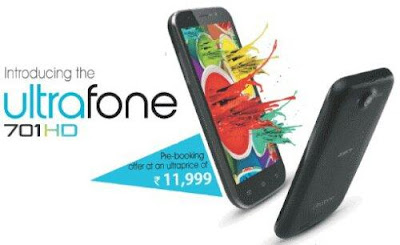
 Zen Ultrafone 701HD – Rs 11,999


Zen entered the affordable quad-core smartphone segment with its Ultrafone 701HD. It is an extremely affordable quad-core, large screen combo priced at Rs 11,999. The smartphone rivals Micromax’s A116 Canvas HD, which features a similar set of superior specs such as quad-core processor, 5-inch HD display, 8MP rear camera and a 2MP front facing camera. However, Zen has lowered the price by around Rs 3,000. On paper, the device looks at par with other potential devices in the same segment.


Zen Ultrafone 701HD--teachingeye.blogspot.in

(image:techclap.com)


Here’s a quick look at the specs of the Zen:
  • 5-inch IPS display with 1280 x 720 pixels resolution
  • Dual SIM (GSM + GSM)
  • 3G, Wi-Fi 802.11 b/g/n, Bluetooth 4.0
  • GPS
  • 8MP rear camera with LED Flash, BSI sensor and 3.2MP front-facing camera
  • 4GB internal memory 32GB expandable memory via microSD card slot


iBall Andi 4.5d Quadro – Rs 14,999

Although slightly old, the quad-core iBall Andi 4.5d Quadro is worth mentioning. Fuelled by a 1.2GHz quad-core Cortex A7 processor and 1GB RAM, it runs on Android 4.2.1 Jelly Bean. It packs a massive 12MP camera at an affordable price tag that reads Rs 14,999. The device can accommodate two SIMs (GSM + GSM). Unlike most budget smartphones, the Andi 4.5d Quadro does not follow the “phablet” trend and sports a smaller 4.5-inch IPS display. However, the 960 x 540 resolution ensures better screen quality compared to some 5-inchers we’ve seen.


iBall Andi 4.5d Quadro--teachingeye.blogspot.in
(image:ebay.in)


Key highlights of the Andi 4.5d Quadro spec sheet:
  • 4.5-inch capacitive IPS display with 960 x 540 pixel resolution
  • Dual-SIM (GSM + GSM), 3G, Wi-Fi 802.11 b/g/n,
  • GPS
  • Bluetooth 4.0
  • 12MP auto-focus, dual LED rear camera and 3MP front-facing camera
  • 4GB internal storage, expandable by up to 32GB via microSD slot


✖ 
Gionee Elife E3 – Rs 14,999

Gionee is a China-based handset maker that has now entered the Indian market. While the economy Android smartphone segment is already flooded with offerings from Indian handset makers such as Micromax, Karbonn and Lava, among others, there's always room for new entrants if they're able to offer products that deliver good quality and bring a differentiated experience.The Gionee Elife E3 promises to offer power-packed hardware specifications including a 720p display and a quad-core processor, at a budget price in a slim form factor.

Gionee Elife E3--teachingeye.blogspot.in
(image:ibnlive.in.com)

Gionee Elife E3 specifications:

§  4.7-inch HD (1280 x 720 pixels) IPS display
§  1.2 GHz quad-core Cortex A7 processor
§  Android 4.2 (Jelly Bean)
§  Dual SIM (GSM + GSM) with dual standby
§  8MP auto focus camera with BSI Sensor, LED flash and 720p HD video recording
§  2MP front-facing camera
§  3.5mm audio jack, FM Radio
§  DTS 3D Surround Sound
§  Proximity sensor, Ambient Light sensor, G-Sensors and Digital compass
§  1 GB RAM, 16GB internal memory, expandable memory up to 32GB with micro SD
§  3G, WiFi 802.11 b/g/n, Bluetooth 4.0, GPS
§  1800 mAh battery

This is what you can get in Rs 15000/- There are more good phones in this range but we just sorted phones with high configuration. Hope it Helped you in Selecting your Dream and budget smartphone.

Thank You!!


Please Dont Forget to Suscribe us on Youtube and like us on Facebook. follow us on Twitter too.

Friday, 9 August 2013

Customize Your Android Home Screen With Google GRID

Today all over the globe there is android glamour. each and every person wants to use android phone. since android has the customization restriction we cant get the full of the visual appearance. but still everyone wants uniqueness in it. so here is the way for achieving that.
Try installing Google GRID to you android device. It will give you full access to you for customizing your home screen.

teachingeye


(image:mycolorscreen.com)
Just follow this link to get detailed installation instruction for google GRID.


Please Dont Forget to Suscribe us on Youtube and like us on Facebook. follow us on Twitter too.

Thank You!!

Thursday, 1 August 2013

Weak signal??? there's Instabrowser

Connection slow? Data usage approaching your monthly maximum? To load Web pages more quickly on your iPhone when you have a bad signal or to lower your data usage, give Instabrowser a go. This $2.99 iPhone app loads only the HTML of a Web page -- stripping out all the JavaScript and CSS -- to bring you your mobile content more quickly. There is also a free, ad-supported version of the app called Instabrowser Zero.
Instabrowser, not to be confused with InstaBrowser, is a great app for subway commuters and anyone who spends a portion of the day trying to access Web pages with a poor signal. I found that it loads pages more quickly than Chrome and Safari; the developer states Instabrowser can cut load times and data usage by 90 percent or more.


(image: droidmanic.com)
Instabrowser provides a URL bar at the top of the screen along with a Google search box. Along the bottom are buttons to bookmark pages, navigate forward and backward, load the full version of a page, manage multiple tabs, tweak the settings, and show a table of contents.
In settings, you can change the font size and choose to load images along with text or text only for even faster load times. You can also change Instabrowser's user agent, which is set by default to Mobile Safari, to another browser such as Firefox or IE or choose Safari (desktop) to ask Instabrowser to load the full version of a page if the mobile version is giving you trouble. Deeper in settings, you can tweak paragraph spacing and column padding as well as change the theme (currently there are two, a light blue and a dark red theme).
Tap the right-most button and Instabrowser will display a table of contents for a page. It uses a Web page's header tags to present a more orderly list of the headlines on a page, but it's not always available because some pages don't use such tags. When it's available, the table of contents makes it easier to find the relevant content on a page. In many cases, the layout of an HTML-only page forces to you to scroll past large sections that are poorly formatted.
If the table of contents isn't available for a particular, try tapping the lighting button at the bottom of the screen. It displays the original version of a Web page, which is useful for pages that require JavaScript to load properly.


Monday, 29 July 2013

How to Pause Android music by putting your hand over your phone

Android smartphones comes with great media players, but because of the lock screen, pausing music can take a few seconds. EasyMute is an Android app that allows us to quickly pause your music by simply putting our hand over the proximity sensor, even when our phone is locked.
Optionally, we can configure easyMute to lower the volume to a preset level. After installing easyMute, just tap the Enable easyMute button to turn it on.

easy mute---TheTeachingEye
(image:www.tecflap.com)
That's it. Keep in mind that, in order for easyMute to work, your phone must have Android 2.1 or higher and a proximity sensor. For the Samsung Galaxy S III, make sure to enable the proximity sensor by going to Settings > Motion.
Thats It...!!


Related Posts Plugin for WordPress, Blogger...